Data Tools for the Verse
Built by a solo dev and Star Citizen fan who wanted better tools while playing. Route optimisation, trade analysis, mining loadouts, cargo management, and asset tracking — all in lightweight overlays that sit on top of the game. Most of it now runs free in your browser too — no download, no login.
See what's inside →Web tools: no login needed · Desktop app: Windows 10+, .NET 8.0 · Mobile: iOS live, Android testing
Fly hands-free.
Just say it.
Request take-off and landing, start engines, run pre-flight — all by voice, without leaving the cockpit. Rename any command to suit your own phrasing, and chain several into a single macro that fires on one word.
The app and all web tools stay free · Windows 10+, .NET 8.0

// The floating toolbar — everything one click away, always on top of the game
Maximize Every
Cargo Run
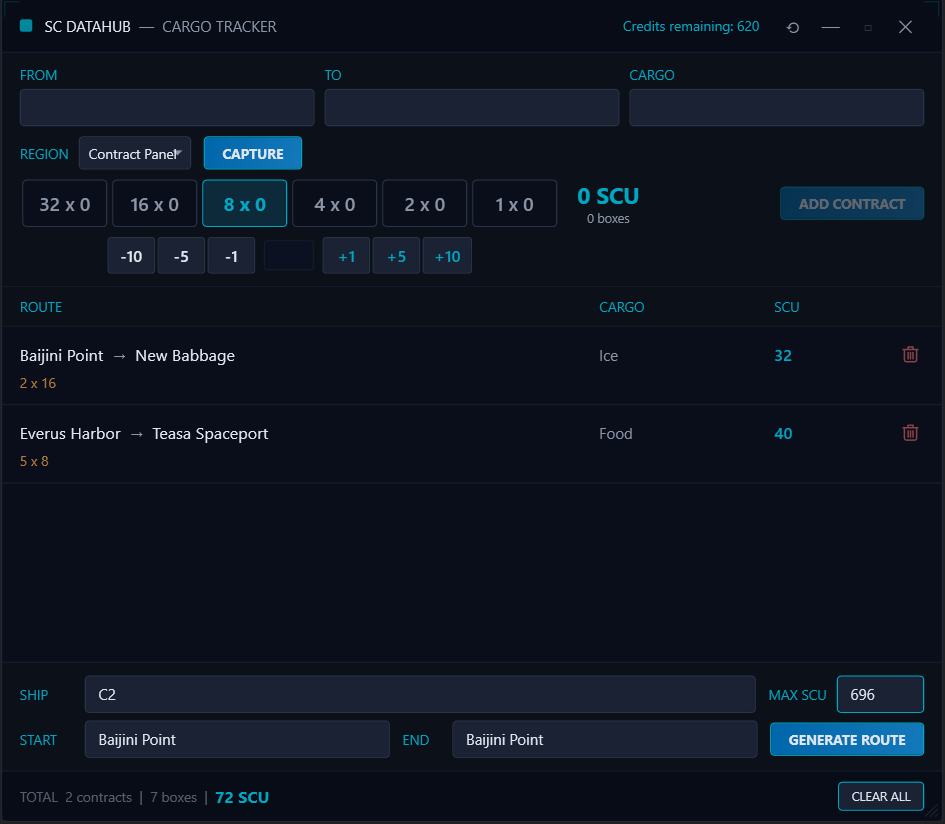
Stop alt-tabbing to spreadsheets. SC DataHub lets you enter cargo contract details on screen using a hotkey, plans multi-stop routes matched to your ship's SCU capacity, and generates an optimized route sheet you can follow step by step.
- Quick-entry cargo overlay triggered by configurable hotkey
- Multi-stop route optimization across Stanton
- SCU capacity planning matched to your ship
- Step-by-step route sheet with load / unload instructions
- Screen capture to read contract details automatically *
* Screen capture uses AI vision credits, available via affordable top-up packs.
See Your Cargo
at Every Stop
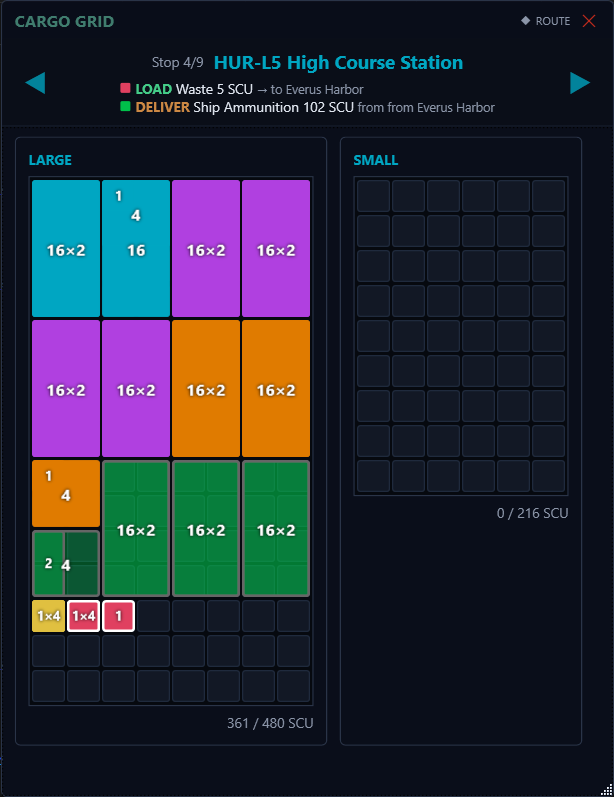
A visual cargo grid that maps your ship's hold in real time. Each commodity is colour-coded so you can see exactly what's loaded, what needs delivering, and how much space is left — across both large and small bays. Navigate stop by stop and know precisely what to load and unload without guessing.
- Visual grid layout matched to your ship’s cargo bays
- Colour-coded commodities for instant identification
- Step through each stop with load and deliver instructions
- Large and small bay capacity tracked separately
- See total SCU usage at a glance
Trade Smarter,
Profit More
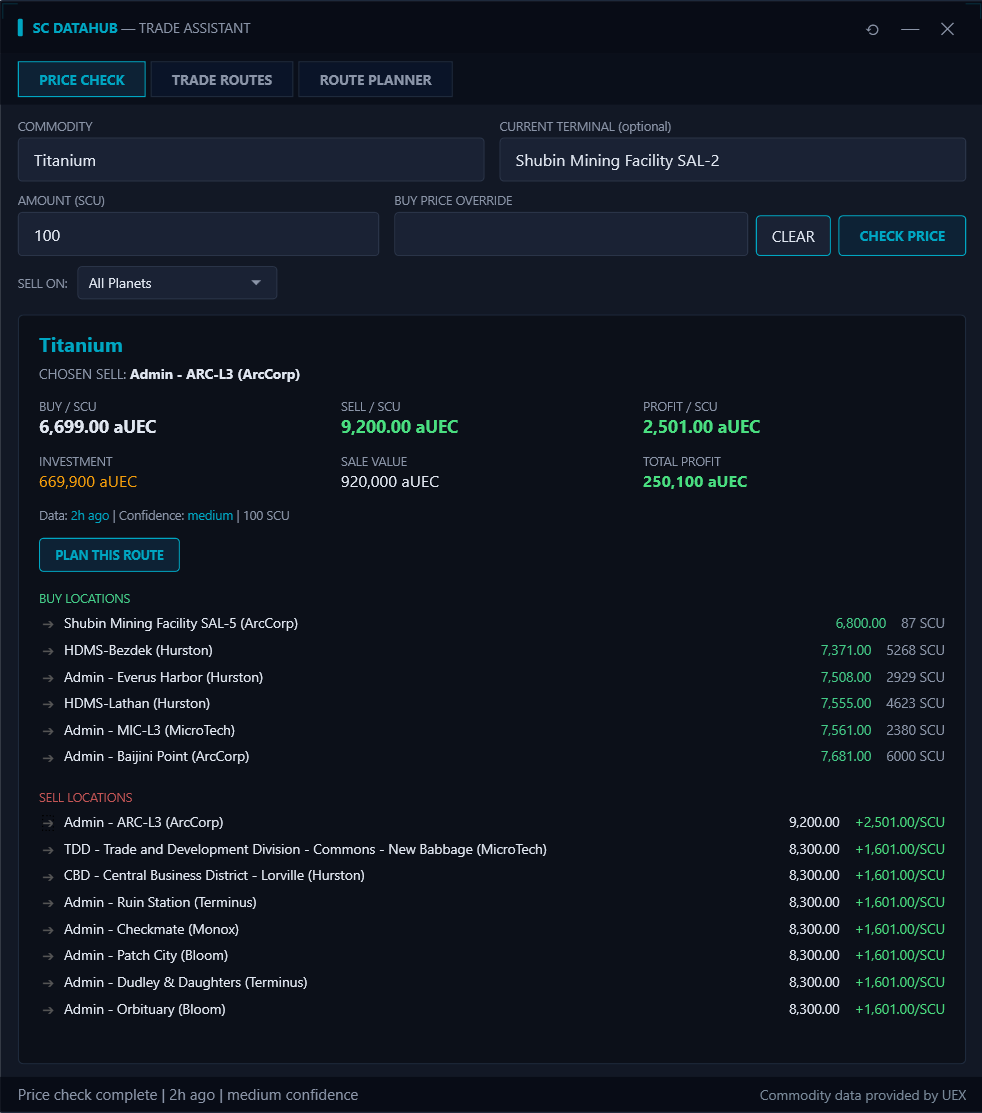
Real-time commodity price checking, trade route discovery, and profit analysis — all from one window. Find the best deals across Stanton, compare buy and sell locations, and send profitable routes straight to your route planner.
- Instant price check with profit per SCU across all locations
- Trade route finder sorted by profit, ROI, distance, or score
- One-click "Plan This Route" to send trades to your route sheet
- Filter sell locations by planet and override buy prices
- Live commodity data powered by UEX
Find the Best
Trade Routes
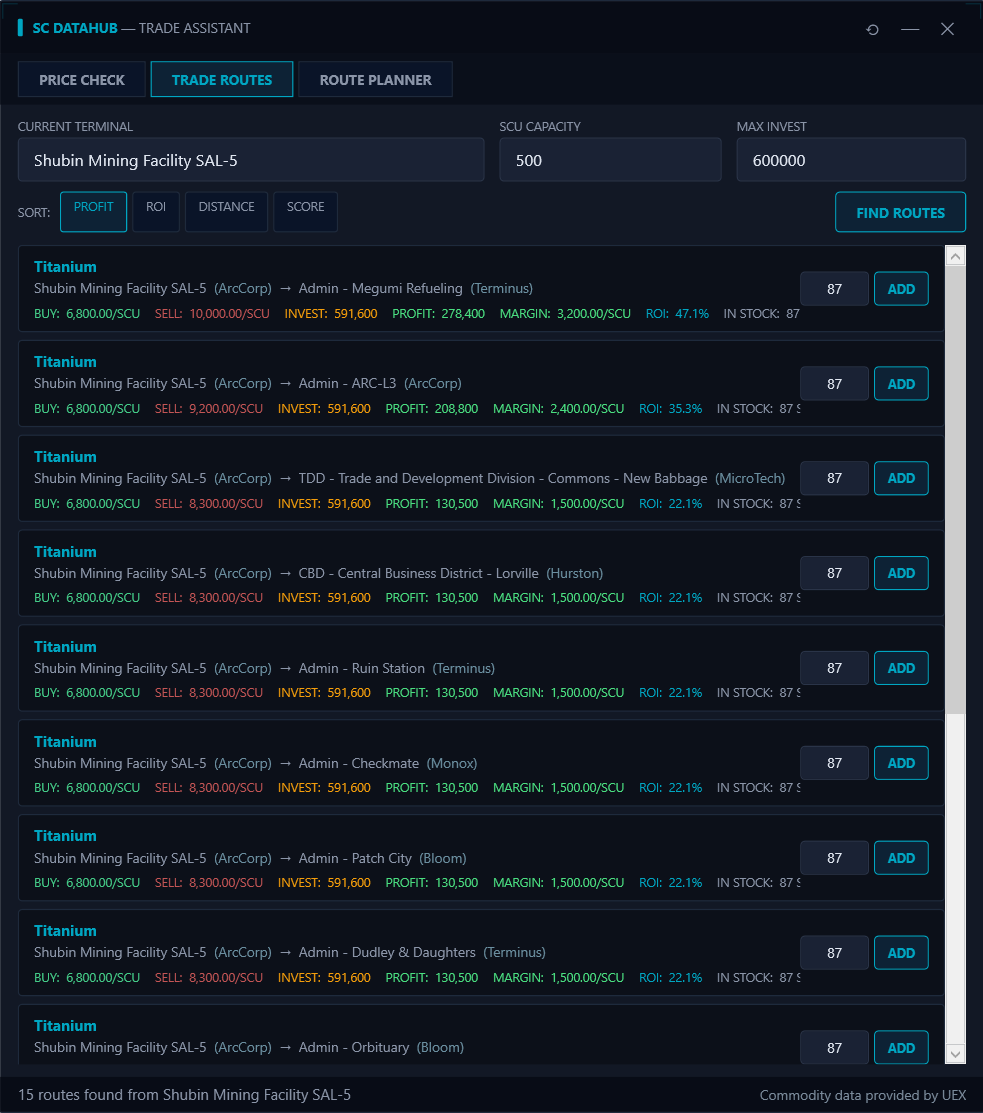
Enter your current terminal, ship capacity, and budget — then let SC DataHub find every profitable route available. Sort by raw profit, ROI, or distance to match your playstyle, and add the best runs to your route planner with a single click.
- Set SCU capacity and max investment to match your loadout
- Sort routes by profit, ROI, distance, or combined score
- See buy / sell prices, margin, and stock at a glance
- Add routes directly to your route planner
Stay in the
Cockpit
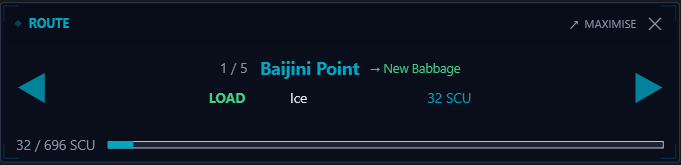
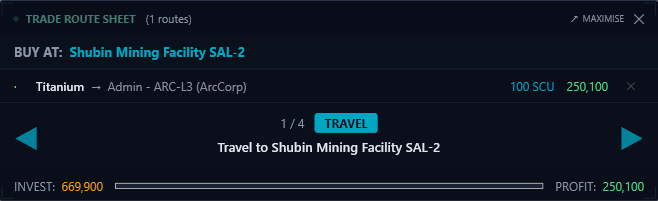
Minimize your route sheet into a compact overlay that sits on top of the game. It shows your current stop, what to load or unload, and where you're heading next — just click through each step as you complete your deliveries. Works for cargo hauling, trade routes, and mining.
- Compact overlay stays on top of Star Citizen
- Click through stops as you complete each delivery
- Shows cargo, SCU, and load / unload instructions at a glance
- Trade routes show investment and profit tracking
- Mining scanner overlay identifies materials in real time
- Expand back to the full route sheet at any time
Your Assets & POIs,
All in One Place
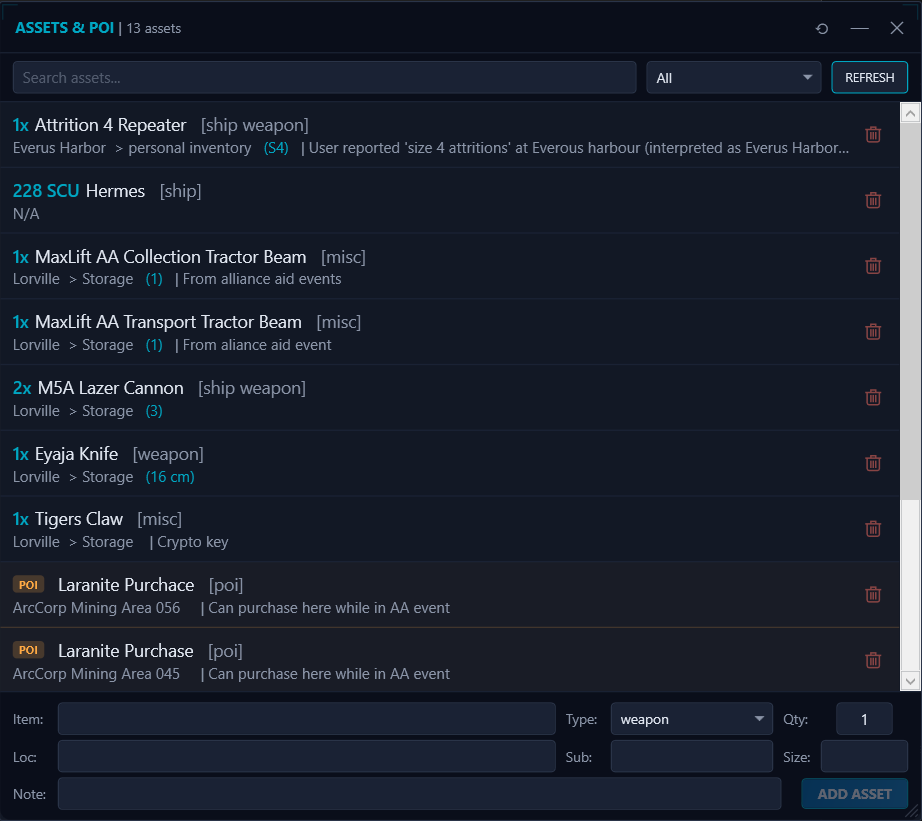
Track every ship, weapon, component, and piece of gear you own. Save points of interest with notes so you never forget that perfect mining spot or hidden vendor.
- Complete asset inventory — ships, weapons, gear, and misc items
- Location and storage tracking for every item
- Save points of interest with custom notes
- Search and filter across your entire collection
Mine Smarter,
Not Harder
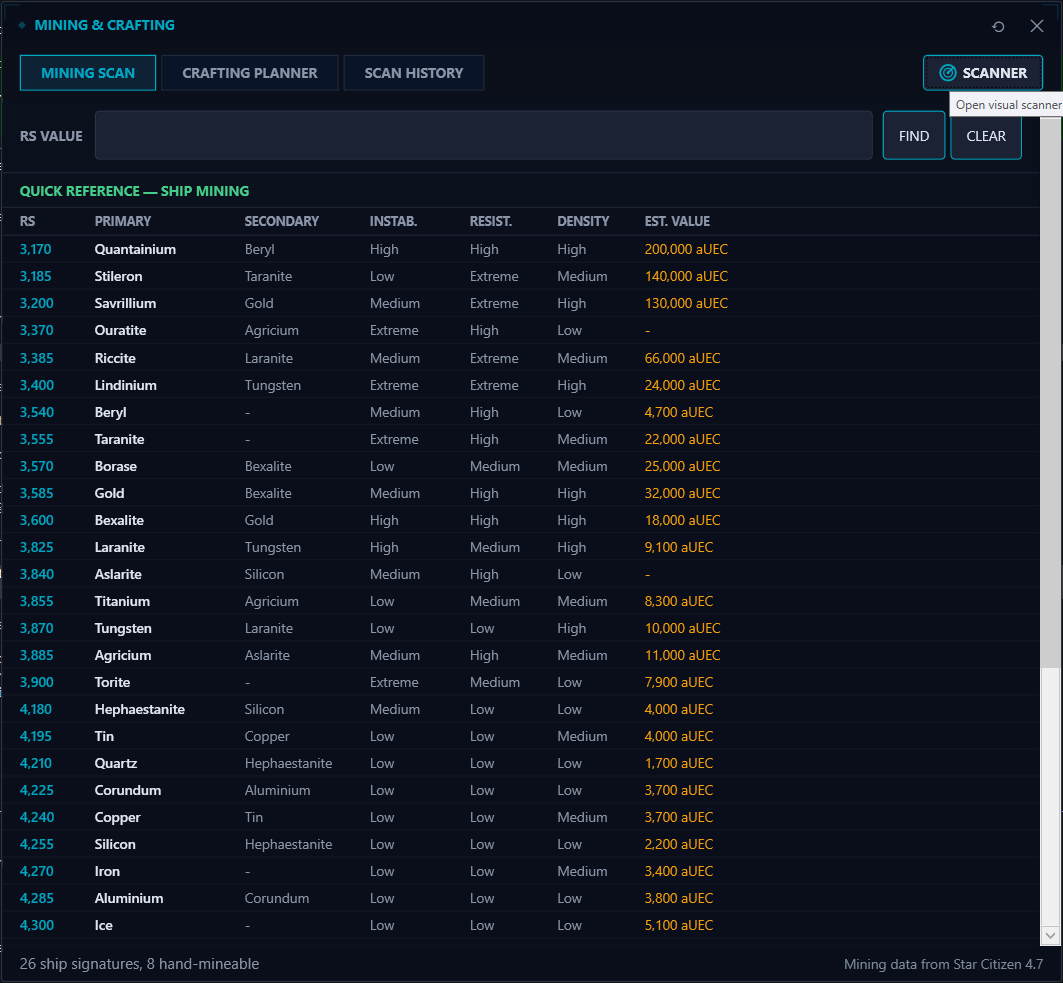
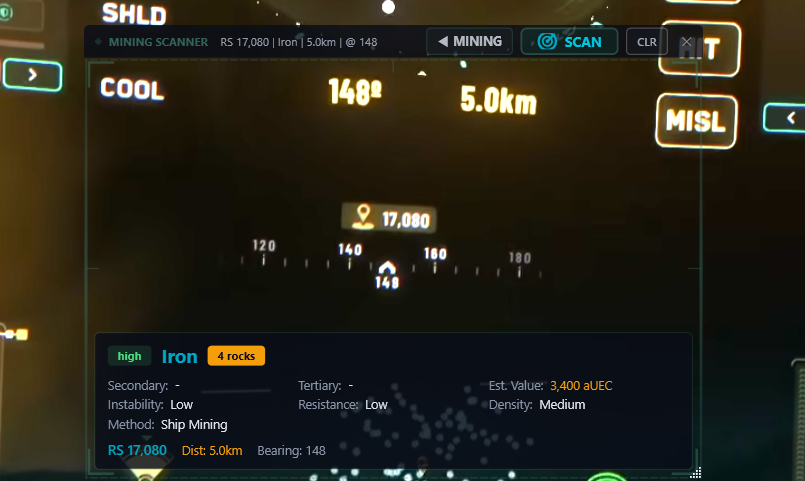
Complete RS signature reference with instant lookup, estimated values, instability and resistance ratings for every mineable material. Use the AI-powered visual scanner to capture your in-game mining HUD and instantly identify what you're looking at — no alt-tabbing to spreadsheets.
- Full RS signature reference for all ship and hand-mineable materials
- AI visual scanner reads your mining HUD and identifies materials *
- Instability, resistance, density, and estimated value per material
- In-game scanner overlay with bearing, distance, and rock count
- Instant RS value lookup — type a value, get the material
* Visual scanner uses AI credits, included in your monthly credit allowance.
Plan Your Builds,
Track Your Progress
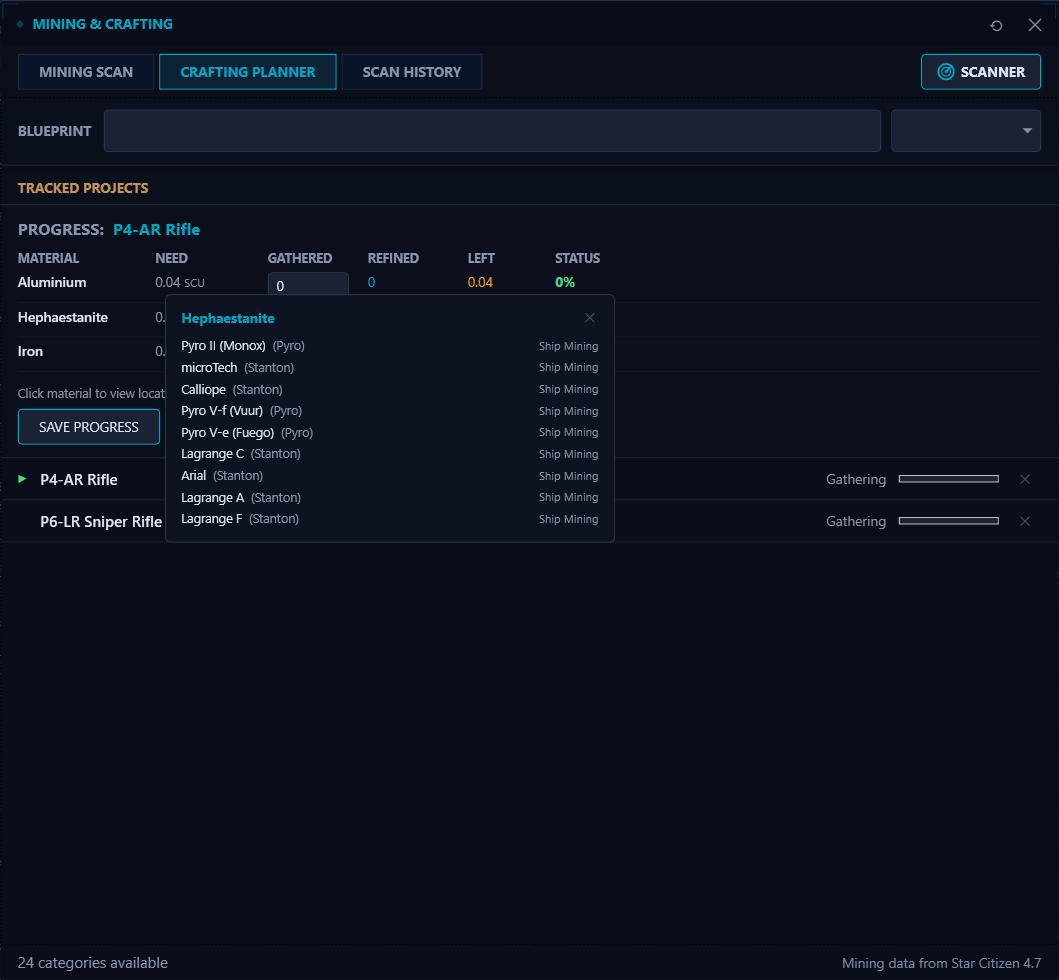
Pick a blueprint, track the materials you need, and see exactly where to find them. The crafting planner shows your gathered and refined quantities, highlights what's left, and links every material to the planets and moons where it spawns.
- Browse blueprints across 24 categories
- Track gathered and refined material progress per project
- Click any material to see mining locations across Stanton and Pyro
- Manage multiple crafting projects at once
- Mark projects complete when you're done
Download SC DataHub
Create a free account to unlock all core tools and start flying smarter. AI-powered features use credits — you get a monthly allowance to get started.
In active development — expect rough edges
SC DataHub is shipped, stable, and actively evolving. You may encounter the occasional bug, and new features land regularly. Found something? Tell us on Discord and we'll get it sorted.
You may see a Windows SmartScreen or antivirus warning during installation. This is normal — the app is code-signed, but the certificate is new and hasn't built up reputation with Windows yet. This will resolve over time as more people install.
Prefer no install? Download the portable ZIP.
Read the Guides
Step-by-step walkthroughs for cargo hauling, mining, crafting, and the other tools. The fastest way to get productive after installing.
Browse all guidesThe verse in your pocket
The SC DataHub mobile app puts the reference half of the platform on your phone: ship specs and hardpoints, mission rewards and blueprint paths, mining ore data, ship and FPS weapons, and commodity prices. Look things up on the sofa, at the kiosk, or while your ship is claiming. Free, no account, nothing collected.
iPhone & iPad
Approved and available now. It is new, so it may not show in App Store search yet. The badge takes you straight there.

Help get it on Google Play
Google requires a closed test with at least 12 testers for 14 days before a new app can go live. Sign up and we will send you the install link. Install it, poke around, and you have done your bit.

// Free · no account · nothing collected
Core App. Free.
AI Features. Credits.
I'm a solo developer who built SC DataHub to solve problems I personally ran into while playing Star Citizen. All core tools — routes, trade, fleet, mining — are available to everyone.
AI-powered features (like screen capture analysis and cargo route reading) rely on cloud services that have a real cost to run. To keep things fair and sustainable, these features use credits. Every user receives a monthly allowance of credits to get started.
If you find SC DataHub useful and want to help keep it running, you can support the project with a credit top-up. You'll receive additional credits as a thank you, and every purchase directly helps cover AI running costs and fund new features.
This is an evolving project — features and pricing may change as the app grows.
Core Features — Available to Everyone
- All core tools — routes, trade, fleet, mining
- Monthly AI credit allowance included
- Mining scan analysis & cargo capture
- Full access with a registered account
- No paywalls, no subscriptions required
Support the Project
- Additional AI credits as a thank you
- Help keep the AI running for everyone
- Fund ongoing development & new features
- Early access to upcoming tools
- Supporter role on Discord
Roadmap
- ✓ Cargo tracker with configurable hotkey
- ✓ Multi-stop route optimization
- ✓ Full & minimised route sheet overlay
- ✓ SCU capacity planning per ship
- ✓ Asset & POI management
- ✓ Screen capture contract reading
- ✓ Trade assistant with price checking
- ✓ Trade route finder with profit & ROI
- ✓ Trade route planner & history
- ✓ Mining scan with RS signature lookup
- ✓ AI-powered visual mining scanner
- ✓ Mining loadout builder with live stats
- ✓ Equipment shopping list by location
- ✓ Crafting planner with material locations
- ✓ Mobile companion app on iOS
- → Link to RSI account
- → Mobile companion app on Android (closed testing)
- ○ Org tools & group features
- ○ Advanced route analytics
- ○ Community feature voting
Connect with Fellow Pilots
Get help, share feedback, suggest features, and connect with other SC DataHub users on Discord.
Join Our DiscordReady to Fly Smarter?
The core app is free — AI features use credits to stay sustainable. Get the tactical edge in the verse.
Get SC DataHub